Adjusting intensity on a China Top facial device should start with the exact model, not a guess. Controls and recommended settings can differ between devices, even when their screens look similar. Check the user manual for the intensity button, available levels, treatment areas, and session limits. Keep the device dry, and inspect its treatment head and cable before use. Clean, dry skin makes it easier to notice how the device feels. Start at the lowest setting. Increase only as the manual allows, and only if the sensation stays comfortable. Mild warmth or tingling may occur with some technologies, but pain, burning, or persistent redness means you should stop. Not a contest.
If you are searching for how to adjust the intensity level on a new facial device, use a cautious test rather than copying someone else’s routine. Apply the treatment head gently to a small area, follow the stated movement and timing, and note the level used. Do not press harder to compensate for a low setting. Avoid sensitive or irritated skin unless the manufacturer specifically permits treatment there. People with implanted medical devices, skin conditions, or recent procedures should ask a qualified health professional before use. Device guidance matters more than a generic online tip. One detail is easy to miss: depending on the model, a higher number may change output, duration, or both. Read the display carefully. This guide explains what to check, how to adjust gradually, and when to pause and seek advice.
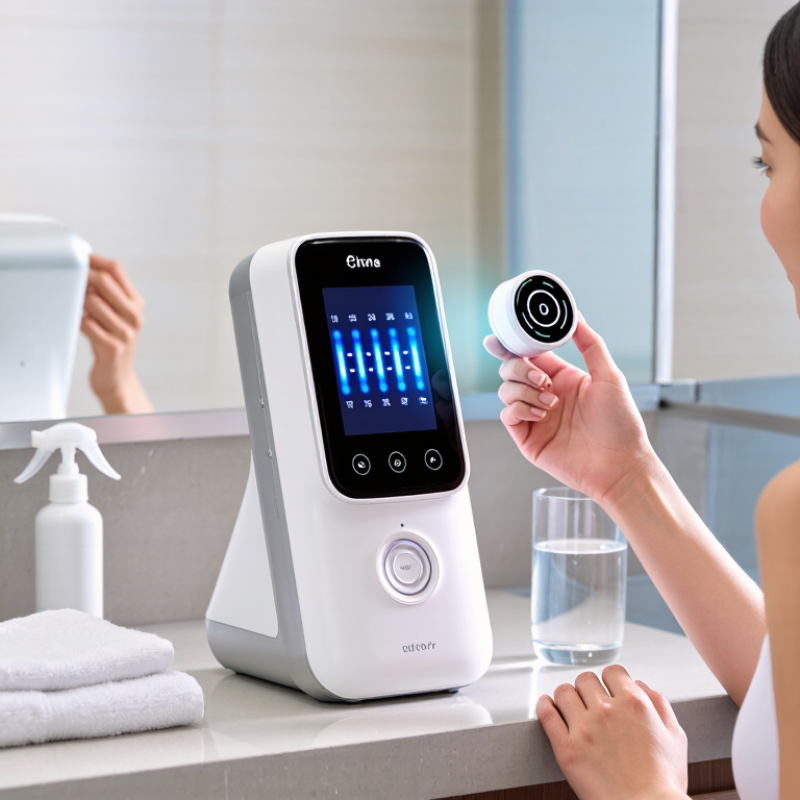
Locate the intensity controls before placing the device against your skin. They may be marked with plus and minus signs, shown as bars, or accessed through a touch screen. Check the user guide, since controls vary between devices. A power button may also change modes when held down, so avoid pressing buttons at random. Start low.
Treatment modes often use different light settings, vibration patterns, or timed routines. Look for clear labels or icons, then confirm the selected mode on the display before starting. A cleansing mode, for example, may feel different from a warming or massage mode. Do not assume a higher intensity means better results. If the instructions do not explain a symbol, pause and check the guide instead of guessing. I may be overcautious here, but unclear controls are worth a moment’s attention.
Tips: Begin with the lowest comfortable setting and follow the session time in the manual. Test a small area first, and stop if you notice pain, unusual heat, or persistent redness. Keep the device moving only if its instructions recommend movement; some modes require steady contact. Afterward, note the setting and how your skin felt, since comfort can vary from day to day.
Before adjusting intensity on a China-top facial device, read the manual for its exact controls. Settings can differ, even between similar-looking devices. Find the recommended starting level, treatment duration, and any warnings for your device. Do not guess from a screen icon. If the instructions are unclear, pause and ask the seller or the device’s support team. I used to rush this part. That was not very sensible.
Prepare clean, dry skin. Remove makeup, sunscreen, and oily residue, then pat your face dry with a soft towel. Check for redness, cuts, or irritation; avoid treating those areas. Keep hair and jewelry away from the treatment area. Start at the lowest intensity the manual recommends, and follow its directions for a patch test if one is specified. A mild sensation may be expected, but pain or persistent burning is a reason to stop. Skin is not identical every day, so reassess how it feels before each session.
When adjusting a facial device, choose the lowest setting that feels comfortable and follows the device instructions. Intensity scales are not comparable across technologies, so a “3” on one device may not match a “3” on another. Start on clean, dry skin and test a small area first. Keep the device moving if the instructions require it. Stop if you feel pain, burning, or persistent tingling. Mild warmth is not a reason to increase the setting.
Evidence also calls for patience. A 2016 Cochrane review of light therapies for acne included 71 trials and 4,211 participants. The studies varied in treatment methods and outcomes, limiting certainty about benefits. That does not establish a universal safe intensity for every facial device. Use the lowest setting recommended for your device and intended treatment, and do not raise it during a session just to seek faster results. It is easy to confuse stronger sensations with better results. I would rather pause and check the instructions than guess. If irritation continues, stop using the device and seek advice from a qualified healthcare professional.
With a facial device, increase intensity slowly rather than chasing a stronger sensation. Start at the lowest setting and follow the device manual for session length and frequency. Keep the device moving as directed; a warm, comfortable feel should not become painful, hot, or sharply prickling. Small steps matter.
Watch your skin during use and again over the next day. Note redness, stinging, unusual dryness, or swelling, and pause if these appear. Clinical evidence differs across LED, microcurrent, heating, and cleansing devices, so one intensity schedule cannot suit them all. The American Academy of Dermatology recommends testing new skin-care products on a small area twice daily for 7–10 days; that guidance is for topical products, not devices, but it reinforces the value of patient observation. I would not treat “no reaction today” as proof that a higher setting is right tomorrow.
Tips: Keep a simple log of the setting, session time, and how your skin feels. Use the lowest effective level, and do not use a device on irritated or broken skin. If a reaction persists, stop and seek advice from a qualified clinician.
| Step or Situation | Suggested Approach | What to Monitor | When to Adjust or Stop |
|---|---|---|---|
| Before the first session | Read the device instructions, check which modes are suitable for your skin, and use the device only as directed. Start with clean, dry skin unless the instructions specify otherwise. | Check for cuts, irritation, unusual sensitivity, or active skin problems in the treatment area. | Do not use on irritated or broken skin. Ask a qualified healthcare professional if you are unsure whether the device is appropriate for you. |
| First use | Choose the lowest available intensity and follow the recommended treatment time and movement technique. Do not assume that a higher setting gives better results. | A mild, temporary sensation may vary by device and person. Pay attention to discomfort, heat, stinging, or unusual tightness. | Stop if the sensation becomes painful or uncomfortable. Follow the device’s guidance about testing a small area before full use. |
| After a comfortable session | Keep the same setting for several sessions before considering a change. Increase by only one available step, and only if the instructions allow it. | Observe your skin during use and over the following hours for persistent redness, swelling, tenderness, or irritation. | If your skin reacts, reduce the intensity or pause use. Do not increase intensity to compensate for a shorter session. |
| During each session | Use gentle, steady movements and avoid repeatedly treating the same spot. Keep the device away from the eyes and other areas excluded in its instructions. | Notice changes in comfort as you move between facial areas; skin sensitivity can differ across the face. | Stop immediately if you feel pain, burning, or an unexpected strong sensation. Do not continue through discomfort. |
| After treatment | Follow the device’s aftercare instructions and keep your routine gentle if your skin feels sensitive. | Check whether redness or sensitivity settles as expected according to the device instructions. | Pause use and seek professional advice if a reaction is severe, persistent, or worsening. |
| Changing device modes | Treat each mode as a separate setting. Begin at its lowest level rather than carrying over an intensity that felt comfortable in another mode. | Different technologies and modes can feel different, even on the same area of skin. | Use only modes and settings described in the device instructions; do not combine modes unless the manufacturer permits it. |
| Important safety note | Intensity scales and treatment recommendations differ between devices. The device’s own instructions take priority over this general guide. If you have a skin condition, use photosensitizing medication, or are uncertain about safe use, consult a qualified healthcare professional before treatment. | ||
After adjusting the intensity of a facial device, switch it off before touching the treatment head. Unplug it from the outlet, or disconnect its charging cable. Let the device cool if it feels warm. A few extra seconds matter. Check the instruction manual, since cleaning methods can differ between models.
Wipe the treatment surface with a soft, lint-free cloth, lightly dampened if the manual allows it. Keep moisture away from openings, buttons, and charging ports. Do not rinse or immerse the device unless its instructions clearly say it is waterproof. Avoid rough pads and strong cleaners; they may damage the surface. It is easy to rush this step, but residue can build up around edges.
Let every cleaned part dry completely before storage. Look over the cable and device for cracks, loose parts, or unusual wear. If anything seems damaged, stop using it and contact the seller or a qualified service provider. Store the device in a clean, dry place, away from direct sunlight, heaters, and splashing water. Keep it out of reach of children and pets. A drawer may work, though a breathable storage pouch can help keep dust off.
Look for plus or minus signs, bars, or a touch screen. Check the user guide before changing settings. Start low.
Read the mode labels or icons, then check the display before starting. Cleansing, warming, and massage modes may feel different.
Not necessarily. Follow the device instructions and choose a comfortable setting. I may be overcautious, but guessing at unclear symbols seems unwise.
Begin at the lowest setting and adjust gradually, following the manual’s session time and frequency. Small steps matter.
Only if its instructions recommend movement. Some modes call for steady contact, so check the guide rather than assuming.
Notice redness, stinging, unusual dryness, swelling, or sharp prickling during use and the next day. Stop if these appear.
Yes. Test a small area first and observe how your skin responds. A quiet first session does not guarantee tomorrow will feel the same.
Note the setting, session length, and how your skin felt. If a reaction persists, stop using the device and seek advice from a qualified clinician.
Before using a facial device, locate its intensity controls and review the available treatment modes so you understand how each setting works. Read the user manual, check that the device is suitable for your needs, and prepare clean, dry skin as directed. If you are learning how to adjust the intensity level on a new facial device, begin with the lowest setting that is appropriate for your chosen mode and follow the device’s instructions.
Increase intensity gradually only if the device’s guidance allows it, paying close attention to how your skin responds throughout treatment. Stop if you experience discomfort or unexpected irritation, and avoid continuing at a setting that feels unsuitable. When finished, turn off the device, clean it according to the manual, and store it safely in a dry place. This careful routine can help make device use more comfortable and support consistent, responsible care.

Luminor Beauty